18 जुलाई 2026 को अपडेट किया गया — वेरिफ़िकेशन गेट्स को वैसे बताने के लिए फिर से लिखा गया जैसे वे आज असल में चलते हैं, रेंडर गेट समेत।
VULK कैसे सत्यापित करता है कि जेनरेटेड ऐप वाक़ई चलती है?
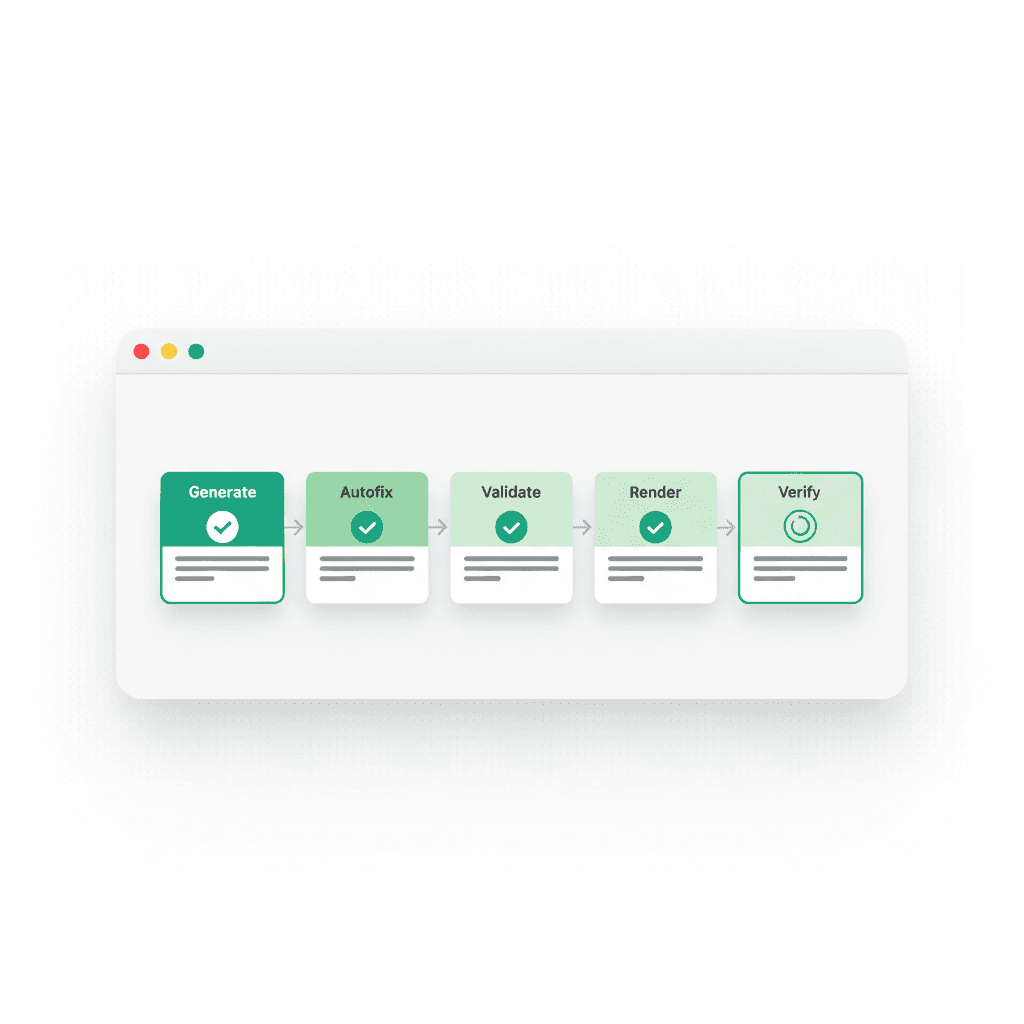
पूरा जवाब: हर VULK जेनरेशन आपके देखने से पहले परतों वाली वेरिफ़िकेशन पाइपलाइन से गुज़रती है। फ़ेज़-गेटेड जेनरेशन बिल्ड को ऐसे संरचित करती है कि फ़ाइलें डिपेंडेंसी क्रम में बनें और विफलताएँ जल्दी पकड़ी जाएँ। एक डिटर्मिनिस्टिक ऑटोफ़िक्सर यांत्रिक त्रुटियाँ (गुम इंपोर्ट, गुम डिपेंडेंसी, टूटे संदर्भ) बिना अतिरिक्त AI कॉल सुधारता है। Vite वैलिडेशन सर्वर पर असली बिल्ड चलाता है — TypeScript कंपाइलेशन, मॉड्यूल रेज़ोल्यूशन, CSS प्रोसेसिंग — और कोई भी एरर री-जेनरेशन के बजाय लक्षित फ़िक्स के लिए मॉडल को वापस भेजता है। अंत में, रेंडर गेट पहले से चल रहे प्रीव्यू को असली Chromium ब्राउज़र में लोड करता है और अगर पेज खाली है, कोई एरर बाउंड्री दिख रही है, या 3D ब्रीफ़ ने रेंडर करता कैनवास नहीं बनाया, तो जेनरेशन को हार्ड-फ़ेल कर देता है।
यह पाइपलाइन क्यों है: AI-जेनरेटेड कोड का एक गंदा राज़ है — उसका बड़ा हिस्सा सही दिखता है और चलता नहीं। मान्य सिंटैक्स, विश्वसनीय इंपोर्ट, सफ़ेद स्क्रीन। "कंपाइल होता है" वही दावा नहीं है जो "रेंडर होता है", और VULK दूसरे को सत्यापित करने के लिए बना है। पैमाना ऑटोमेशन को अनिवार्य बनाता है: प्लेटफ़ॉर्म ने 11,355 प्रोजेक्ट्स में 124,755 कोड फ़ाइलें जेनरेट की हैं, माध्यिका 20 फ़ाइल प्रति ऐप (VULK प्लेटफ़ॉर्म डेटा, जुलाई 2026) — कोई इंसान उस आउटपुट को आँख से नहीं जाँच रहा।
वेरिफ़िकेशन के चरण क्या हैं?
Stage 1: Phase-Gated Generation
    ↓
Stage 2: Deterministic Autofixer
    ↓
Stage 3: Vite Validation (server-side build)
    ↓
Stage 4: Render Gate (real Chromium on the live preview)
    ↓
Stage 5: Fallback Recovery
| चरण | क्या पकड़ता है | कैसे |
|---|---|---|
| फ़ेज़-गेटेड जेनरेशन | फ़ाइलों में फैलती ग़लत धारणाएँ | फ़ाइलें डिपेंडेंसी क्रम में, फ़ेज़ दर फ़ेज़ |
| ऑटोफ़िक्सर | गुम इंपोर्ट, गुम डिपेंडेंसी, टूटे संदर्भ | डिटर्मिनिस्टिक नियम — कोई AI कॉल नहीं, तेज़ और दोहराने योग्य |
| Vite वैलिडेशन | टाइप एरर, अनसुलझे मॉड्यूल, टूटा CSS | सर्वर पर असली vite बिल्ड; एरर → लक्षित AI फ़िक्स |
| रेंडर गेट | सफ़ेद स्क्रीन, एरर बाउंड्री, खाली कैनवास | असली Chromium लाइव प्रीव्यू लोड कर DOM पर दावे जाँचता है |
| फ़ॉलबैक रिकवरी | न सुधर सकने वाली पाइपलाइन त्रुटियाँ | स्टैंडर्ड जेनरेशन लूप पर सहज फ़ॉलबैक |
फ़ेज़-गेटेड जेनरेशन कैसे काम करती है?
सारी फ़ाइलें एक साथ जेनरेट कर उम्मीद करने के बजाय कि वे साथ चलेंगी, VULK फ़ेज़ों में जेनरेट करता है:
- फ़ाउंडेशन — package.json, कॉन्फ़िग फ़ाइलें, एंट्री पॉइंट
- डेटा लेयर — टाइप, इंटरफ़ेस, API स्कीमा
- कंपोनेंट — डिपेंडेंसी क्रम में UI कंपोनेंट
- पेज — रूट पेज जो कंपोनेंट जोड़ते हैं
- इंटीग्रेशन — सब जोड़ना, अंतिम वायरिंग
हर फ़ेज़ को अगला शुरू होने से पहले सफलतापूर्वक पूरा होना होगा। कोई कंपोनेंट ठीक से जेनरेट न हो तो तुरंत पकड़ा जाता है — 50 फ़ाइलें ग़लत धारणा पर लिखे जाने के बाद नहीं।
ऑटोफ़िक्सर क्या सुधारता है?
जब पाइपलाइन कोई यांत्रिक समस्या पकड़ती है — गुम इंपोर्ट, टाइप बेमेल, गुम पैकेज, सर्कुलर डिपेंडेंसी — ऑटोफ़िक्सर स्वचालित मरम्मत की कोशिश करता है:
- गुम इंपोर्ट: प्रोजेक्ट के फ़ाइल ट्री को स्कैन कर सही इंपोर्ट पाथ निकालता है
- गुम डिपेंडेंसी: ज़रूरी पैकेज package.json में जोड़ता है
- टाइप एरर: उपयोग के संदर्भ से अपेक्षित टाइप का अनुमान लगा एनोटेशन जोड़ता है
- सर्कुलर संदर्भ: डिपेंडेंसी चक्र तोड़ने के लिए इंपोर्ट पुनर्गठित करता है
ऑटोफ़िक्सर नई AI कॉल किए बिना काम करता है — यह डिटर्मिनिस्टिक नियम इस्तेमाल करता है, जिससे यह तेज़, सस्ता और दोहराने योग्य है। एक-सा इनपुट हमेशा एक-सा फ़िक्स देता है।
Vite वैलिडेशन क्या जाँचता है?
फ़ाइलें जेनरेट और ऑटो-फ़िक्स होने के बाद VULK सर्वर पर असली Vite बिल्ड चलाता है: पूरा TypeScript कंपाइलेशन, मॉड्यूल रेज़ोल्यूशन सत्यापन, CSS/Tailwind प्रोसेसिंग। यही वह सख़्ती है जिसका सामना आपका प्रोडक्शन डिप्लॉय करेगा — डेव सर्वर वह सह लेता है जिसे प्रोडक्शन बिल्ड ठुकराता है, इसलिए असली बिल्ड से वैलिडेट करना उस तरह के सरप्राइज़ को जल्दी पकड़ता है।
अगर Vite एरर बताता है, वे लक्षित फ़िक्स के लिए AI को जाते हैं — मॉडल सटीक एरर और सटीक फ़ाइल देखता है, ऐप री-जेनरेट करने का अनुरोध नहीं। यह केंद्रित मरम्मत लूप आमतौर पर एक ही इटरेशन में मसले सुलझा देता है।
रेंडर गेट ठीक-ठीक क्या है?
यही वह चरण है जिसे ज़्यादातर AI बिल्डर छोड़ देते हैं, और यही सबसे ज़्यादा मायने रखता है: सोर्स की सारी जाँचें पास हो सकती हैं जबकि ऐप एरर स्क्रीन रेंडर करे। कोई जेनरेशन साफ़ कंपाइल होकर भी रनटाइम पर एक अपरिभाषित वेरिएबल जितनी छोटी चीज़ से मर सकती है — पीछे सफ़ेद पेज या दिखती एरर बाउंड्री छोड़कर।
रेंडर गेट यह छेद बंद करता है। यह पहले से चल रही प्रीव्यू URL को — बिना रीबिल्ड, बिना कृत्रिम ढाँचे — असली Chromium इंस्टेंस में लोड करता है और हार्ड-फ़ेल दावे लागू करता है:
- पेज असली कंटेंट रेंडर करता है (फ़ोल्ड के ऊपर खाली व्यूपोर्ट नहीं)
- कोई दिखती एरर बाउंड्री या फ़ॉलबैक एरर हेडिंग नहीं
- कंसोल में कोई घातक पेज एरर नहीं
- अगर ब्रीफ़ में 3D/WebGL माँगा गया था:
<canvas>मौजूद है और खाली नहीं है - सबूत के तौर पर स्क्रीनशॉट कैप्चर होता है
वह आख़िरी कैनवास जाँच VULK की वेरिफ़िकेशन सोच की पहचान है: 3D सीन के लिए "पेज लोड हुआ" सफलता नहीं है — कैनवास पर रेंडर हुए पिक्सेल सफलता है। गेम्स और 3D प्लेटफ़ॉर्म की #2 कैटेगरी हैं, जेनरेशनों के 5.4% के साथ (VULK प्लेटफ़ॉर्म डेटा, जुलाई 2026), तो यह जाँच बहुत चलती है।
रेंडर गेट फ़ेल होने पर एरर आपको टूटी ऐप थमाने के बजाय फ़िक्स चक्र के लिए मॉडल के पास लौटते हैं।
अगर पाइपलाइन किसी त्रुटि से टकराए तो क्या होता है?
अगर पाइपलाइन किसी चरण पर न सुधर सकने वाली त्रुटि से टकराती है, तो वह सहजता से स्टैंडर्ड जेनरेशन लूप पर लौट जाती है, जो कार्यात्मक आउटपुट देता है। कोड आपको हमेशा मिलता है; वेरिफ़िकेशन उसे भरोसेमंद बनाता है।
यही दर्शन इटरेशन तक जाता है: प्रीव्यू कंसोल एरर बातचीत में वापस भेजता है, तो "चलाओ, एरर पढ़ो, सुधारो" — जो लूप इंसानी डेवलपर हाथ से चलाता है — प्लेटफ़ॉर्म के अंदर सेकंडों में होता है।
दूसरे AI बिल्डरों से यह कैसा है?
ज़्यादातर AI बिल्डर कोड जेनरेट कर आप पर भरोसा करते हैं कि टूटा हुआ आप ढूँढेंगे और बताएँगे। तुलना:
| क्षमता | VULK | Lovable | Bolt | v0 |
|---|---|---|---|---|
| सर्वर-साइड बिल्ड वैलिडेशन | हाँ (असली Vite बिल्ड) | नहीं | WebContainer (इन-ब्राउज़र) | नहीं |
| डिटर्मिनिस्टिक ऑटोफ़िक्स परत | हाँ | नहीं | आंशिक | नहीं |
| फ़ेज़-गेटेड जेनरेशन | हाँ | नहीं | नहीं | नहीं |
| असली ब्राउज़र रेंडर जाँच | हाँ (लाइव प्रीव्यू पर Chromium) | नहीं | सिर्फ़ इन-ब्राउज़र | नहीं |
| 3D के लिए खाली-कैनवास पहचान | हाँ | नहीं | नहीं | नहीं |
| सहज फ़ॉलबैक पाइपलाइन | हाँ | नहीं | नहीं | नहीं |
FAQ
क्या वेरिफ़िकेशन मेरी जेनरेशन धीमी करता है?
वैलिडेशन और रेंडर जाँचें सेकंड जोड़ती हैं, मिनट नहीं, और नतीजे स्ट्रीम होते हुए चलती हैं। यह सौदा जान-बूझकर है: जाँच के कुछ अतिरिक्त सेकंड बनाम आपका सफ़ेद स्क्रीन डीबग करना। माध्यिका VULK बिल्डर को पहली चलती ऐप अब भी साइनअप के 47 सेकंड बाद मिलती है (VULK प्लेटफ़ॉर्म डेटा, जुलाई 2026)।
रेंडर गेट असल में क्या दावे जाँचता है?
आपके लाइव प्रीव्यू के विरुद्ध असली Chromium में लोड होकर: फ़ोल्ड के ऊपर कंटेंट रेंडर होता है (खाली व्यूपोर्ट नहीं), कोई दिखती एरर बाउंड्री नहीं, कोई घातक कंसोल/पेज एरर नहीं, और — जब ब्रीफ़ में 3D माँगा गया हो — एक ग़ैर-खाली WebGL कैनवास। फ़ैसले के सबूत के तौर पर स्क्रीनशॉट कैप्चर होता है।
वेरिफ़ाइड जेनरेशन क्या खत्म करती है?
सबसे आम विफलता वर्ग: ऐसी ऐप्स जो पूरी दिखती हैं और कुछ रेंडर नहीं करतीं। बाद में कोई एरर दिखे तो सेल्फ़-डीबगिंग लूप (प्रीव्यू कंसोल एरर मॉडल को वापस) आमतौर पर एक फ़ॉलो-अप संदेश में ठीक कर देता है।
क्या मुझे इसमें से कुछ कॉन्फ़िगर या चालू करना होगा?
नहीं। वेरिफ़िकेशन हर प्लान पर हर जेनरेशन की डिफ़ॉल्ट पाइपलाइन है। कोई "वेरिफ़ाइड मोड" टॉगल नहीं है।
क्या वेरिफ़िकेशन सभी 8 प्लेटफ़ॉर्म कवर करता है?
सबसे गहरी जाँचें (Vite वैलिडेशन + रेंडर गेट) वेब पर चलने योग्य स्टैक्स कवर करती हैं: React + Vite और Three.js। Flutter अपने असली flutter build web कंपाइल से सत्यापित होता है — ज़ोर से फ़ेल होता बिल्ड अपने आप में गेट है। React Native और Shopify को जेनरेशन-समय की संरचनात्मक वैलिडेशन मिलती है, और उनका इकोसिस्टम टूलिंग (Expo, Shopify CLI) रनटाइम जाँच है।
हर VULK जेनरेशन यह पाइपलाइन डिफ़ॉल्ट रूप से चलाती है। कुछ जटिल बनाइए — auth और डेटा टेबल वाला मल्टी-पेज डैशबोर्ड — vulk.dev पर, और देखिए यह पहली कोशिश में ही कैसे चल जाता है। प्लान Builder $25/माह से।